HVAC Field Report

iPhone & iPad · iOS 18+

Finish the report before you leave the driveway.

HVAC Field Report turns the visit you just finished into a customer-ready PDF service report in about two minutes. Talk it through, confirm the numbers, hand it over. Built for the independent residential and light-commercial technician — gloves on, dirty hands, no signal, several calls a day.

Free plan — no account, no login, nothing to set up.

  • On device
  • No signal needed
  • No account
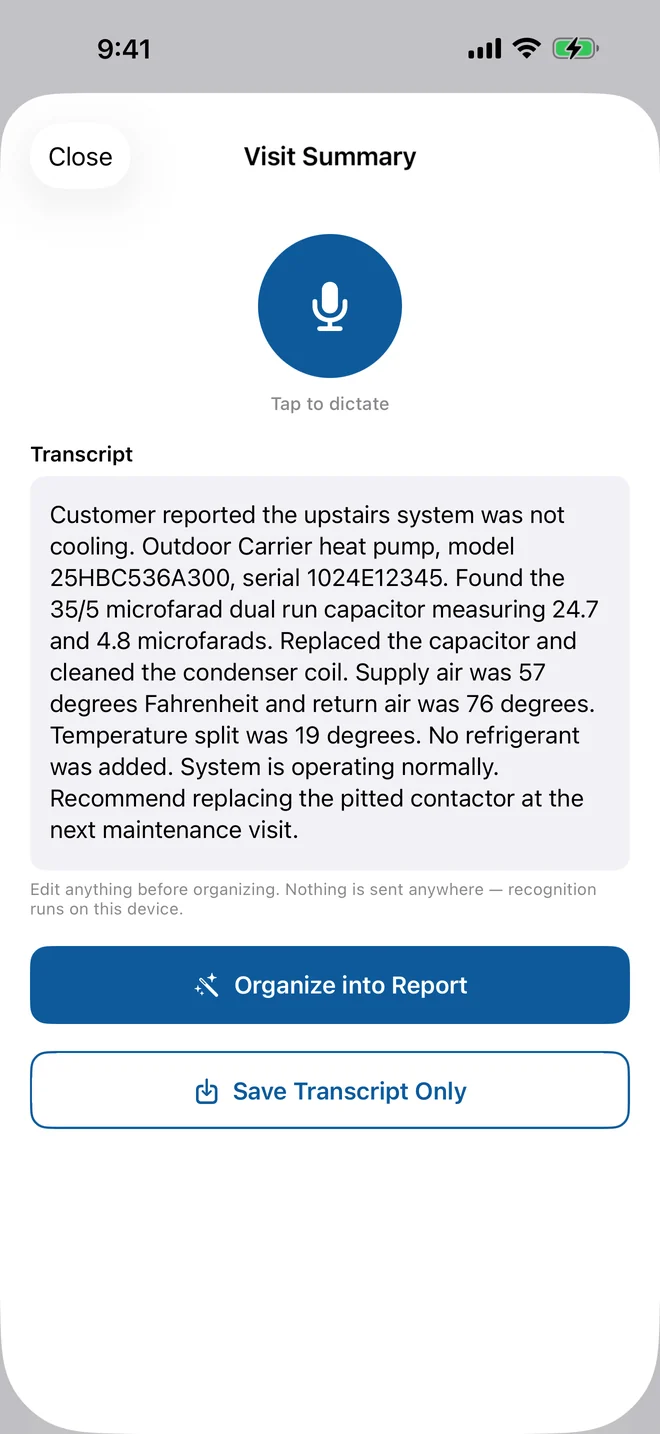
The Visit Summary screen with a dictated transcript describing a Carrier heat pump call.
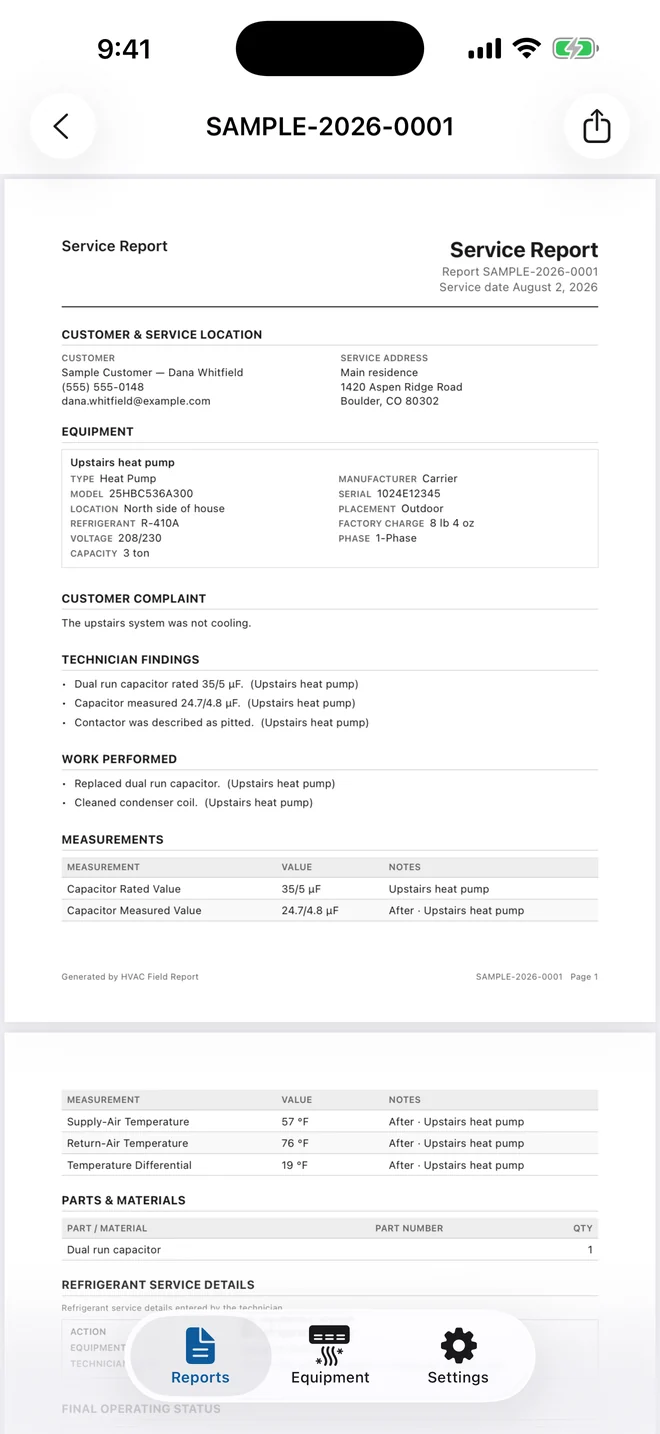
The finished customer PDF, showing equipment details, technician findings and measurements.

The job after the job

The work was done at 2pm. The paperwork gets done at 9pm.

Notes on the back of an invoice. Model numbers half-remembered. A serial you meant to photograph. Then an evening of typing it all into something the customer can read — if it gets typed at all.

~2 minutes from finishing the visit to a finished PDF, standing at the truck.
0 words typed on the fast path. Dictate it, review it, finalize it.
Every number waits unticked for your confirmation before it prints.

How it works

Talk. Confirm. Hand it over.

Three steps, one screen each, all of them offline.

Talk through the visit

Explain the call the way you'd explain it to the customer. Field Report sorts what you said into customer complaint, technician findings, work performed and recommendations — the four sections a service report actually needs.

Recognition runs on the device. Nothing is uploaded, and there is always a typing path if you'd rather not talk.

Visit Summary screen: a large dictation button above a transcript of the technician describing the call.

Confirm the readings and the nameplate

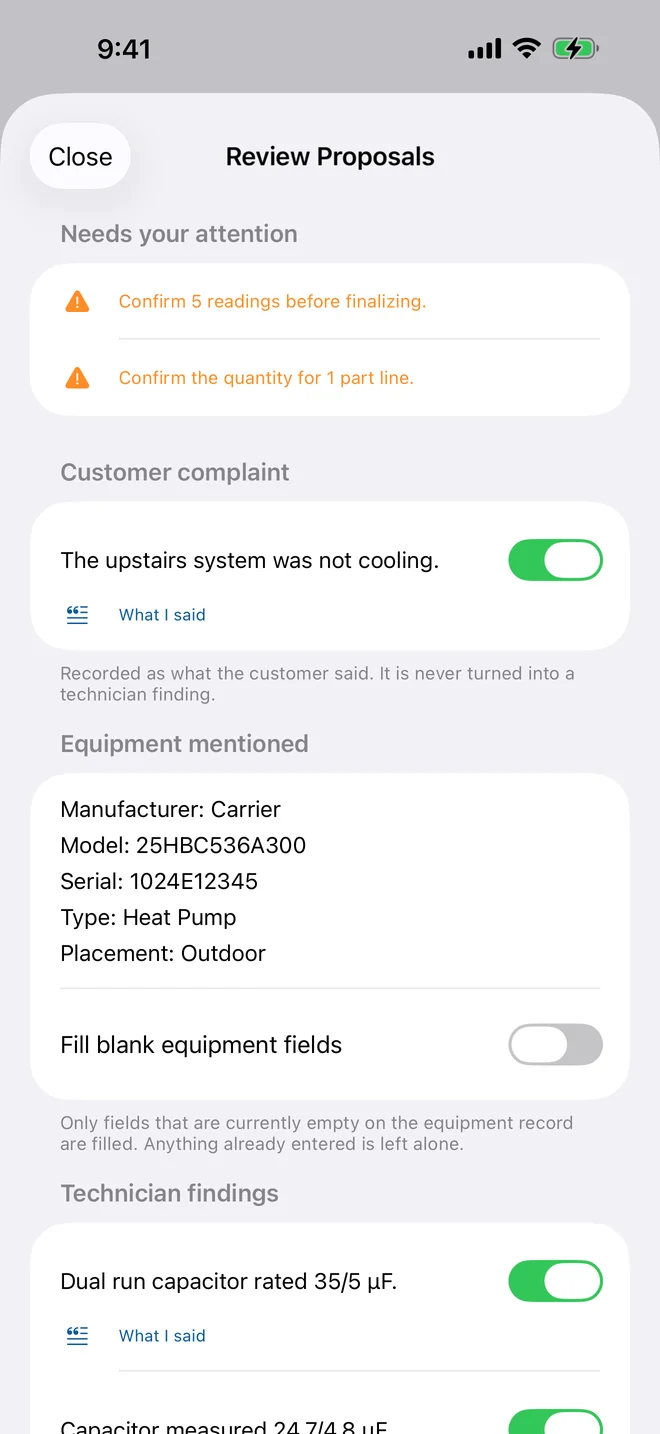
Pressures, temperatures, superheat, subcooling, capacitor readings — each one is pulled out of what you said and left unticked until you confirm it. Nothing lands on the report on its own.

Photograph a filthy outdoor nameplate and the app reads the model and serial off it. Those start unticked too. Numbers come from deterministic parsing, never from a language model.

Review Proposals screen: parsed equipment details and capacitor readings, each with a confirmation toggle.

Hand over a PDF they can read

Clean, selectable, printable, with your business name, logo and license number in the header. Photos, a maintenance checklist, and a signature or typed acknowledgment collected on the spot.

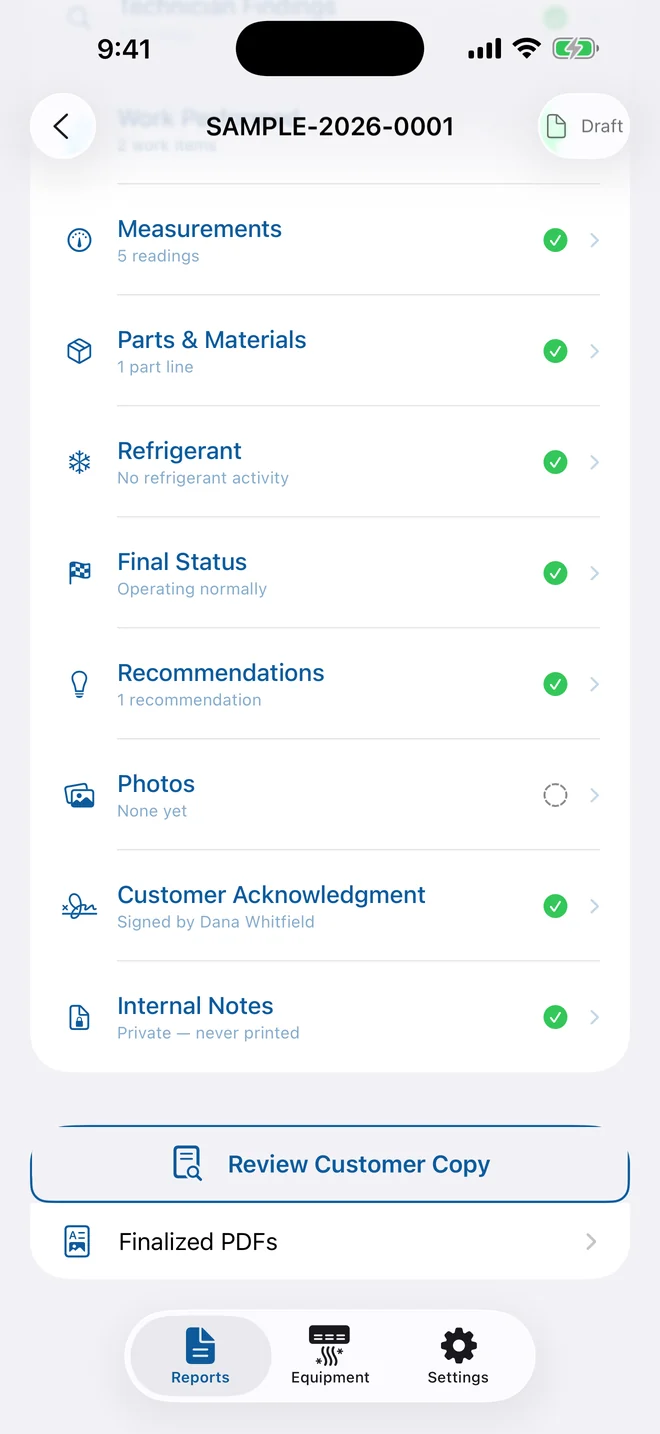
Print it, text it, or email it. Internal notes and internal-only photos never appear on the customer copy.

Report section list scrolled to Internal Notes, marked private and never printed.

What's in it

Everything a service report needs. Nothing it doesn't.

Not a CRM, not dispatching, not invoicing. One job, done properly.

Dictation that sorts itself

One take, four sections. Field Report quotes your own words back into complaint, findings, work performed and recommendations — and shows you which phrase each line came from.

Nameplate capture

Photograph the plate instead of copying it. Model and serial are read off the image and held unticked until you confirm them against the unit in front of you.

Equipment history that remembers

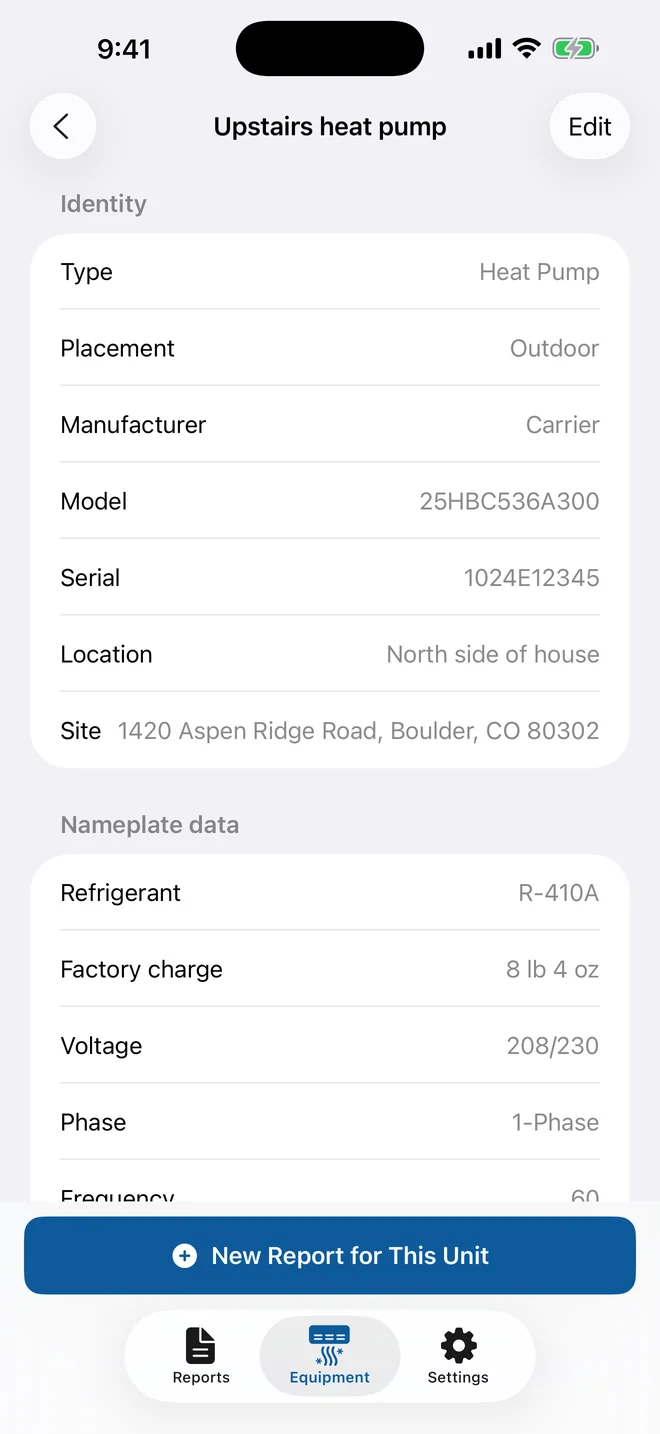
Every unit keeps its own record. Search by customer, address, model or serial — whichever one you actually remember when the callback comes in.

A customer-ready PDF

Selectable text, not a screenshot. Your branding in the header, readings and parts in a table, photos and a signature at the end. Print it or text it from the driveway.

Maintenance checklists

Service, repair and preventive maintenance visits each get the right checklist. On Pro you can change what's on it to match how you actually work.

Signed on the spot

A signature on the glass or a typed acknowledgment, captured while you're still standing there. Corrections create a revision that clears the old signature, so the record stays honest.

A finished HVAC service report PDF showing customer and service location, equipment, complaint, findings, work performed, measurements and parts.

What the customer gets

A report they can actually read.

The document is the product. It is the thing that gets forwarded to a landlord, filed with a home sale, or pulled up two years later when the same unit acts up.

  • Your business name, logo and license number in the header
  • Customer, service location and equipment identified up front
  • Complaint, findings, work performed and recommendations, in your words
  • Measurements and parts in a table, with a refrigerant service section
  • Photos, checklist results, and the signature you collected on site
  • Selectable, printable text — filenames you can find again

Where your data lives

No account. No server. No exceptions.

There is nothing to sign up for and nothing to sign into. Your customers, your equipment records and your reports are stored on your device, and there is no developer-operated server for them to be stored on instead.

  • Works in attics, basements, crawlspaces and mechanical rooms
  • Speech recognition and text organization run on the device
  • Nothing is uploaded, so there is nothing to breach
  • Export equipment as CSV or JSON any time you want it elsewhere
  • Pro keeps working offline from a cached entitlement
An equipment record showing nameplate data for a sample heat pump, stored on the device.

Pricing

Start free. Upgrade when the free reports run out.

Sold through the App Store. Everything you finalize stays yours — viewable, shareable and exportable forever, subscription or not.

Free

$0

No account, no card, no trial clock.

  • 3 finalized reports
  • 10 equipment records
  • 3 most recent visits per unit
  • Dictation and nameplate scanning
  • Photos, checklists and signatures
  • Full customer PDF
Download free

Field Report Pro

$12.99 / month

or $109.99 / year — about seven months free

  • Unlimited finalized reports
  • Unlimited equipment records
  • Complete equipment history, every visit
  • Your logo on the customer PDF
  • Checklist customization
  • Keeps working with no signal
Get Field Report Pro

Prices shown in US dollars. Subscriptions renew automatically until cancelled and are managed by Apple — cancel any time in Settings › Field Report Pro › Manage Subscription, or in the App Store under your Apple Account. Governed by Apple's Standard EULA and our Privacy Policy.

Questions

Straight answers

Does it work without a signal?

Yes. Everything is stored on the device and no screen requires a connection. There is no account, no login and no developer-operated server, so attics, basements, crawlspaces and mechanical rooms are fine.

Do I have to dictate, or can I type?

Every dictation screen has a typing path. If you decline the microphone or speech permission, the typing path is offered in its place and nothing is blocked. The nameplate scanner has a photo-library import fallback if you decline the camera.

Can the app invent a measurement?

No. Pressures, temperatures, superheat, subcooling and capacitor readings always come from deterministic parsing of what you said, never from a language model — on every device. Each one is shown unticked for your review and does not reach the report until you confirm it.

Does it diagnose equipment or certify compliance?

No, and it is not meant to. Field Report organizes information that you supply. It does not diagnose equipment, size systems, or decide whether a unit is operating correctly — those are your professional judgment. It does not certify compliance with any federal, state or local reporting rule, and it does not determine whether such rules apply to a given refrigerant transaction.

What happens to my reports if I stop subscribing?

You keep everything. Every customer, site, equipment record, draft, finalized report and PDF stays on the device and stays viewable, shareable and exportable. Only new Pro-only actions pause.

Can I correct a report I already finalized?

Yes — use Create Revision. A finalized report cannot be quietly edited or deleted as a draft. The revision clears the previous signature so the customer acknowledges the corrected record rather than the old one.

Which devices does it run on?

iPhone and iPad running iOS 18 or later. On devices with Apple Intelligence, dictated text is organized on the device using the system Foundation Models framework. On all other devices the app falls back to rule-based parsing and shows a notice saying so.

Is this invoicing software?

No. Field Report records the parts and quantities used on a visit, but it has no pricing, no totals and no payment. If you need to bill from it, the PDF and the JSON export give you everything to key into whatever you already invoice with.

How do I get a refund?

Purchases are handled by Apple, so refunds are requested through Apple at reportaproblem.apple.com. We can't issue them directly — but tell us what went wrong, we'd rather fix it.

What this app does not do

HVAC Field Report organizes information that you supply. It does not diagnose equipment, size systems, or decide whether a unit is operating correctly — those are your professional judgment.

It does not certify compliance with any federal, state or local reporting rule, and it does not determine whether such rules apply to a given refrigerant transaction. Every reading, finding and recommendation on a report is what the technician entered or confirmed.

Your last call of the day ends in the driveway.

Download it, run it on the next job, and see whether the report is done before you put the truck in gear.

  • Free plan
  • iOS 18+
  • iPhone & iPad